
8. Plan Services
Plan Services module includes SIM card service and device service.
8.1 SIM Card Service
SIM Card Service is primarily designed for cellular devices using Acceleronix SIM cards. The AMP provides capabilities for SIM card status inquiry and renewal for associated devices.
8.1.1 SIM Card Service Configuration
The prerequisite for using the SIM card service is to use Acceleronix SIM cards and connect to the CMP platform. After ordering a SIM card, user enterprise information will be added to the CMP platform, and the login credentials (username and password) for the CMP platform will be provided to the user. You need to log in to the CMP platform to obtain the enterprise’s authorization key information.
CMP: Log in to CMP (opens new window)(https://cmp.quectel.com/), and navigate to “Enterprise” > “Enterprise Configuration” > “API Configuration”. After enabling the API, you can view the AppKey and AppSecret.
After obtaining the above authorization key information, provide it to the business representative to apply for the creation of a BSS merchant ID. Once the account is created, you will receive the enterprise merchant ID and the BSS platform login credentials (username and password).
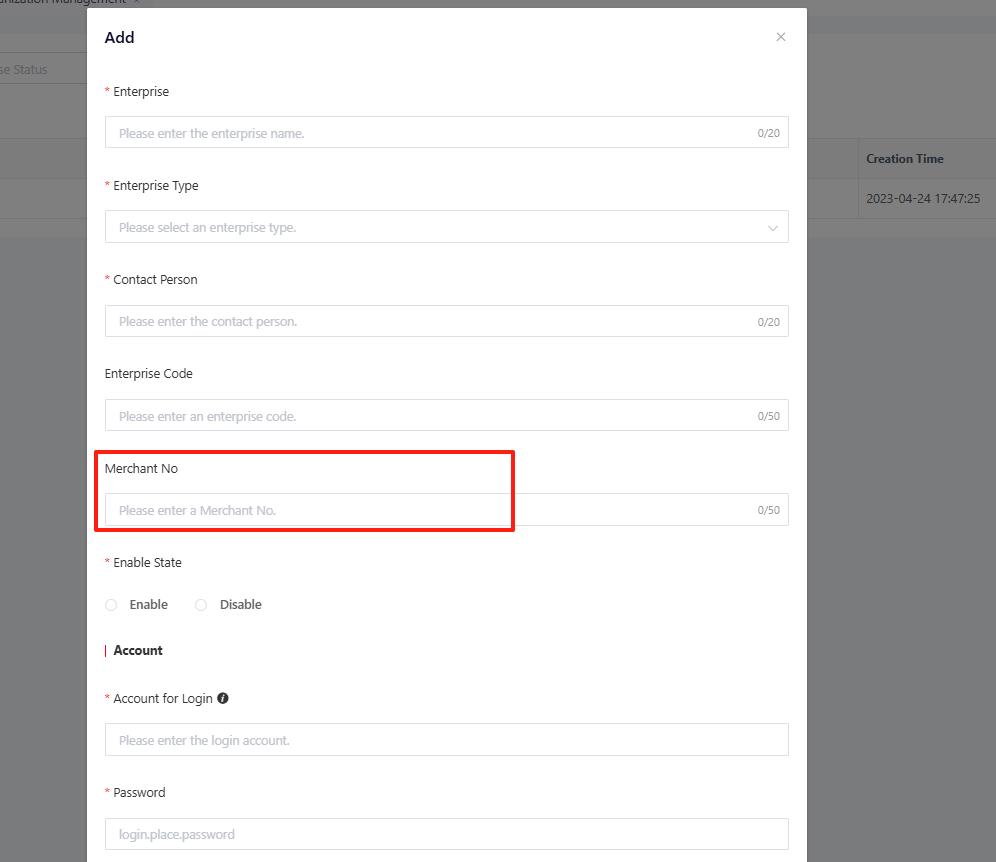
After obtaining the enterprise merchant ID, navigate to “Enterprise” > “Organization”, and click “Edit” to edit the current-level enterprise and enter the BSS merchant ID, then click “Confirm” to save the changes.
8.1.2 Information Reporting for Device SIM Card
There are three methods for devices to report SIM card information:
- Method 1: For cellular devices, QthSDK has already integrated the SIM card information reporting command (click the link for reference documentation). No additional development is required for this method; however, it only supports one device with one SIM card scenarios.
- Method 2: If a single device contains more than two SIM cards, and the device distinguishes between all-in-one devices and tablets, it can also be reported through the predefined TSL model of this platform.
| Field Name | Type | Description |
|---|---|---|
| q_retain_device_aio_info | Struct | It is used for devices to report the SIM and RTK information of the all-in-one machine. It is necessary to combine the tablet information (q_retain_device_tablet_info) to save the association relationship. When there is a change, the BSS interface is dynamically called to update the relationship. JSON object: All-in-one machine IMEI: q_retain_device_aio_imei, TEXT, 100 bytes; All-in-one machine EID: q_retain_device_aio_eid, TEXT, 32 bytes; All-in-one machine ICCIDS: q_retain_device_aio_iccids, TEXT, 256 bytes. If there are multiple ICCIDs, they are separated by commas; All-in-one machine RTKAccount: q_retain_device_aio_rtkaccount, TEXT, 256 bytes. If there are multiple RTK Accounts, they are separated by commas. |
| q_retain_device_tablet_info | Struct | It is used for devices to report the SIM and RTK information of the tablet. It is necessary to combine the all-in-one machine information (q_retain_device_aio_info) to save the association relationship. When there is a change, the BSS interface is dynamically called to update the relationship. JSON object: Tablet ICCID: q_retain_device_tablet_iccids, TEXT, 256 bytes. If there are multiple ICCIDs, they are separated by commas; Tablet RTKAccount: q_retain_device_tablet_rtkaccount, TEXT, 256 bytes. If there are multiple RTKAccounts, they are separated by commas. |
8.1.3 Information Query for Device SIM Card
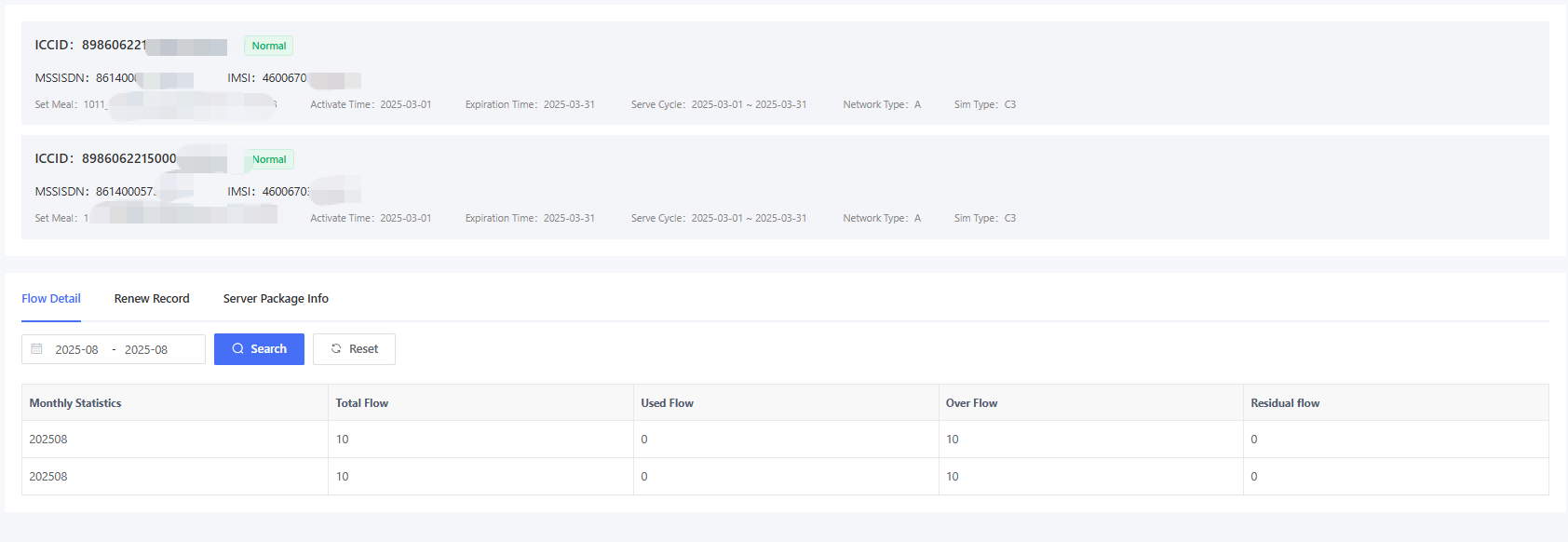
After the device reports SIM card information, you can query the SIM card information in "Device" > "Device List" > "Details"> "SIM Card” page.
SIM card information consists of the upper and lower parts. The upper part displays the basic information of each SIM card based on the number of cards reported by the device, while the lower part includes three types of information Data Usage Detail, Renewal Record, and Service Package.
Data Usage Detail: It displays the monthly data usage details of each SIM card. Renewal Record: It displays the renewal records of the SIM cards under the device. Service Package Information: A function unique to CMP 2.0, displaying the data package details of the device’s SIM card in ToC scenarios.


8.1.4 SIM Card List Query
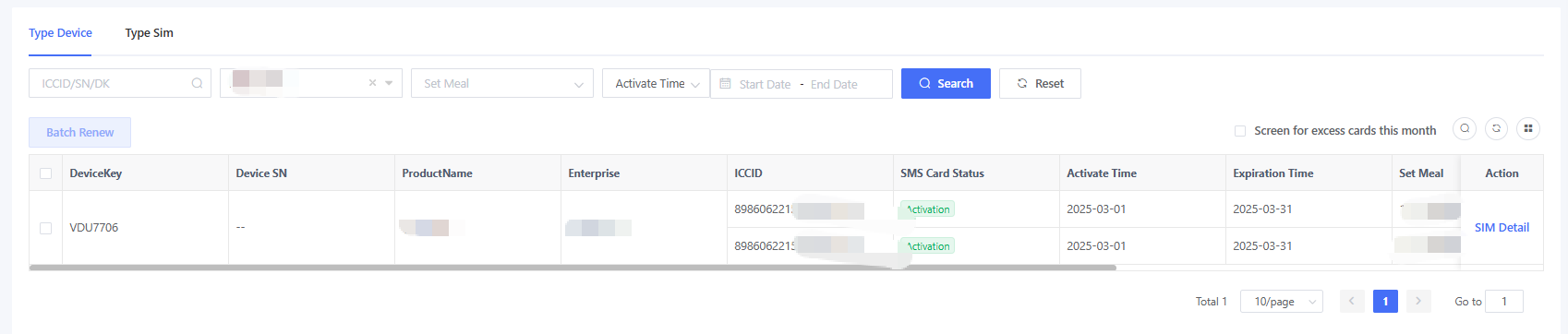
Navigate to “Plan” > “SIM Card Service” to view the SIM card list of all devices under the authorized enterprises. The interface distinguishes between SIM card entity and device entity for SIM card viewing.
- SIM Card Entity: Applicable to scenarios where a single device uses one SIM card, or where a single device uses multiple SIM cards, but each card is billed individually based on the SIM number.
- Device Entity: Applicable to scenarios where a single device uses multiple SIM cards that share a data pool, with the device acting as the billing entity.
Filter for Over-Quota Cards This Month: Quickly query and filter the list of cards suspended this month due to over-quota deactivation.
Service Suspension Status Explanation:service suspension equals card deactivation (unified status), and the suspension reason is displayed according to the actual situations.
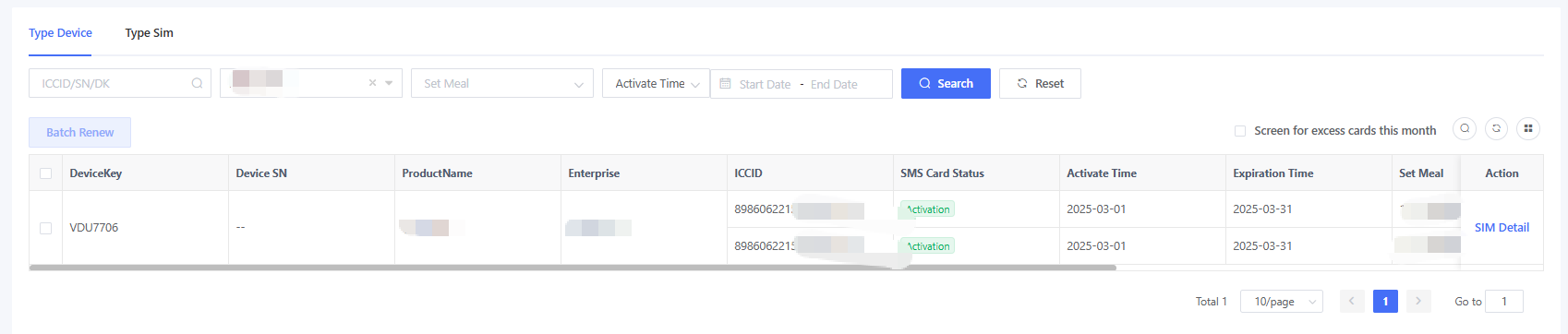
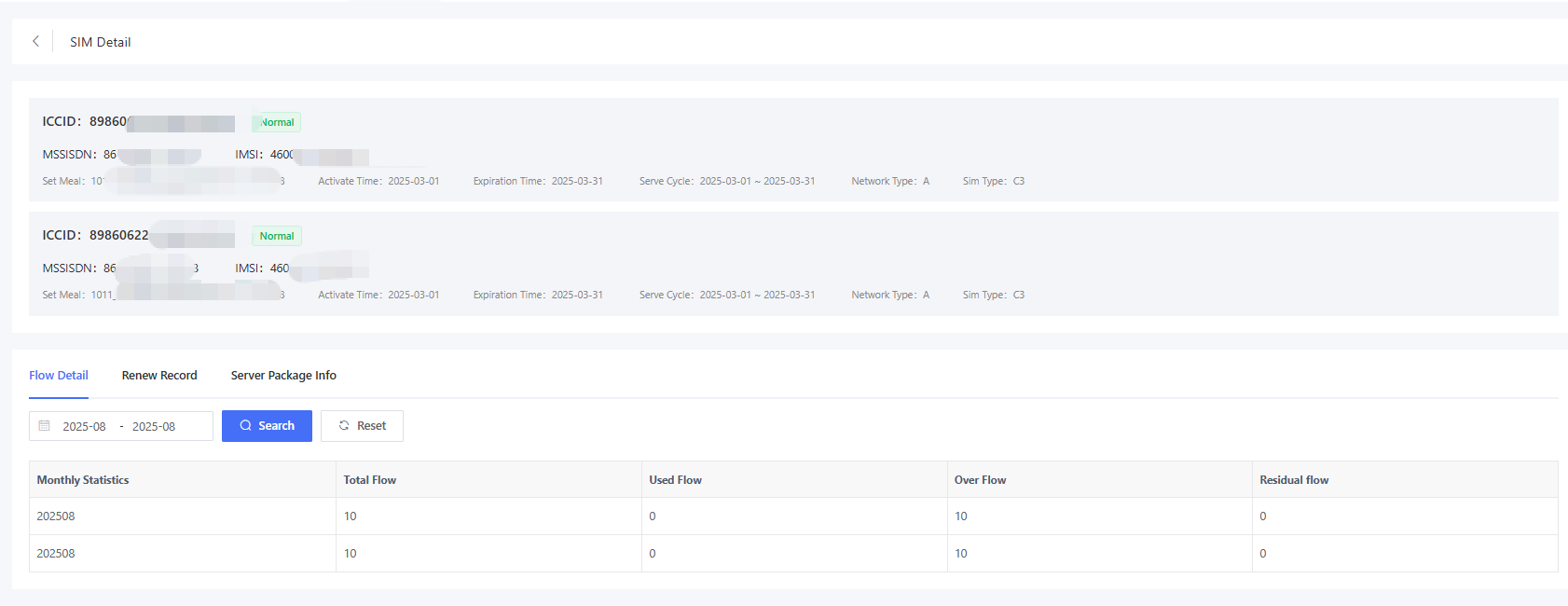
Click “Details” to view detailed information about the device's SIM card.
SIM card information consists of the upper and lower parts. The upper part displays the basic information of each SIM card based on the number of cards reported by the device, while the lower part includes three types of information Data Usage Detail, Renewal Record, and Service Package.
Data Usage Detail: It displays the monthly data usage details of each SIM card. Renewal Record: It displays the renewal records of the SIM cards under the device. Service Package Information: displaying the data package details of the device’s SIM card in ToC scenarios.
8.1.5 SIM Card Renewal
SIM card renewal is supported. Renewal means extending both the data plan and service period. For example, renewing a 1-year service period for 1 year will extend it to 2 years.
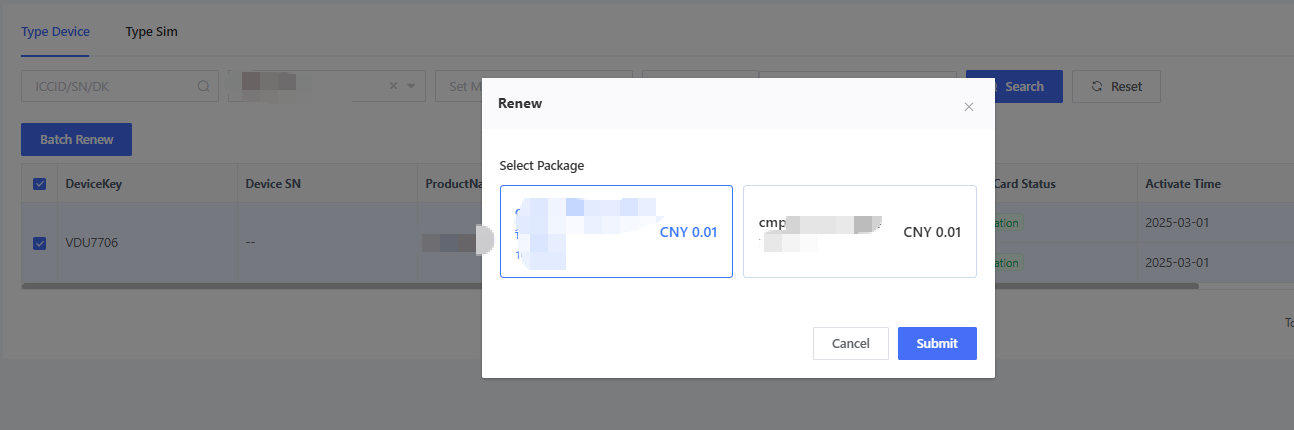
Navigate to “Plan” > “SIM Card Service” page, select the SIM cards you want to renew (note: all selected SIM cards must share the same data plan), then click “Renew in Batches” to choose the appropriate renewal package, and complete payment to finish the renewal process.
8.1.6 SIM Card Alert Configuration
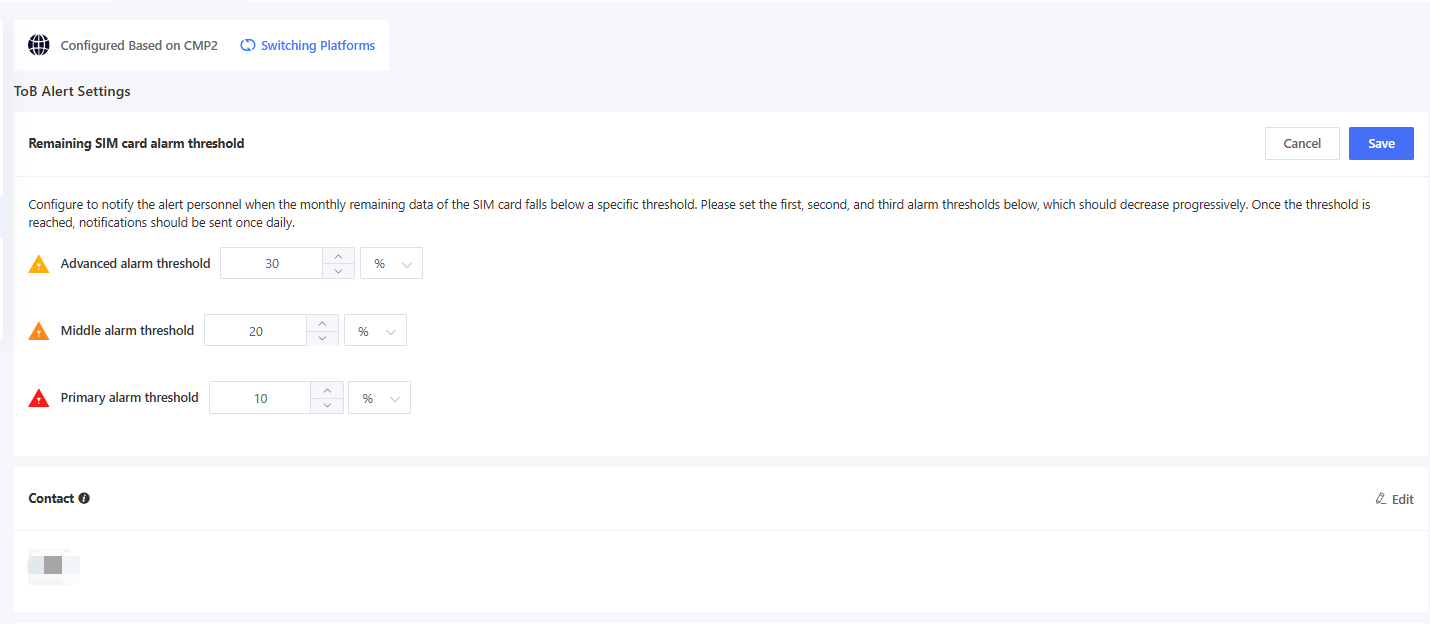
AMP supports SIM card usage monitoring. In the “System” > “Platform Configuration” page, you can configure both B2B and B2C alerts, where ToB alert configurations include remaining quota alert thresholds and over-quota suspension thresholds, while ToC alert configurations support end-user notifications X days before SIM service expiration.
(1) Balance Alert Threshold Configuration
AMP supports a three-tier threshold configuration, where alert thresholds progressively decrease from Level 1 to Level 3. For example, Level 1 alert remaining at 30%, Level 2 at 20% and Level 3 at 10%. When incrementing the Level 1 threshold by 30, the Level 2 threshold must be less than 30, and the Level 3 threshold must be less than that of Level 2. The alert unit can be selected as % or MB, with % selected by default. The units for Level 2 and Level 3 alerts cannot be modified independently and will inherit the unit configured for Level 1.
After the threshold configuration, select the corresponding alert contact person. When a SIM card's remaining quota triggers any threshold, the AMP will automatically notify the selected contact person once daily via system message/email.
(2)Overage Suspension Threshold Configuration
If an overage of 10 MB is set, when a SIM card with a 30 MB/month data plan exceeds 40 MB of monthly usage, the AMP will automatically suspend the card and send notifications. The suspended SIM card will be automatically reactivated next month.
(3)ToC Service Status Notification
This configuration is used to notify end users 30 days, 7 days before and on the day of the service package expiration. By default, this configuration is disabled. Once enabled, notifications will be sent to devices through the TSL model based on the rule. Currently, only TSL model notifications are supported.
The TSL model of alert notification is as follows:
| Field Name | Type | Description |
|---|---|---|
| q_retain_device_sevice_notice | Struct | Used to notify the service status of the device JSON object: Service name (serviceName): ENUM, 1-SIM service, 2-RTK service, 3-device service Service status (serviceStatus): ENUM, 1-Expire in 30 days, 2-Expire in 7 days, 3-Expire in 1 day |